
Focal Insight
Data insight for smarter business decisions.
Focal Insight is our energy monitoring platform for Focal clients. A check meter on your supply records every half-hour, so you can check your municipal bill, track consumption, watch power quality and manage demand and power factor, in one login.
For Focal clients. Logins are set up by invitation.
Who this is for
Businesses that manage their electricity, not only pay for it
Focal Insight is for our clients' facilities, finance and operations teams: the people who pay the electricity bill, run the plant, or answer for both. Each sees the same half-hour record of the site, with the sections their job needs.
Why check metering
You can't manage what you can't measure.
The council's meter measures for the council. A check meter is your own record of the same supply, half-hour by half-hour, so decisions about electricity start from your numbers rather than an invoice.
A bill is a total, not an explanation
An invoice gives you the month's kWh, one demand figure and a rand amount. It cannot tell you which shift, which machine or which half-hour made them. Half-hour data can.
Your own record of the supply
When a reading is estimated or a charge looks wrong, an independent record of the same half-hours is what turns a suspicion into a query, with the dates and figures to back it.
Measure, change, measure again
Every saving starts from a baseline. With one on record, the effect of a new shift pattern, power factor correction or a solar system shows in the same meter's numbers, before and after.
What it does
Four things to act on, from one meter
Focal Insight turns your check meter's half-hours into the figures a business can act on: what you pay, how good your supply is, how you use energy and what sets your demand.
Verify council billing and track consumption
The platform works out each month's bill from your own meter's readings and your tariff, line by line. Set it beside the municipal invoice and an estimated reading, a misread meter or the wrong rate stands out. Consumption is kept by the half-hour, day and month, so you can follow it over time.
Watch power quality
Each phase's voltage is shown against the NRS 048-2 band of 230 V ±10%, with current, unbalance and frequency alongside and the minutes spent outside each band counted. A supply problem becomes the dates and half-hours you can take to the utility.
Optimise operations and energy use
Half-hour data shows when the load starts, when it peaks and what keeps running overnight and at weekends. Those are the common places to look for savings: equipment left on, start-ups that overlap, and loads that could run at a cheaper time.
Manage demand and power factor
Half-hourly kW, kVA and kvar with power factor, and the half-hour that set each day's peak. On a demand tariff, knowing what sets the peak, and the power factor in that half-hour, is how you plan to bring the demand charge down.
What you see
Real screens from a client's site
The screens below are Focal Insight as a client sees it, from one of our clients' sites in October 2026, with the client's name and the name of its tariff removed.
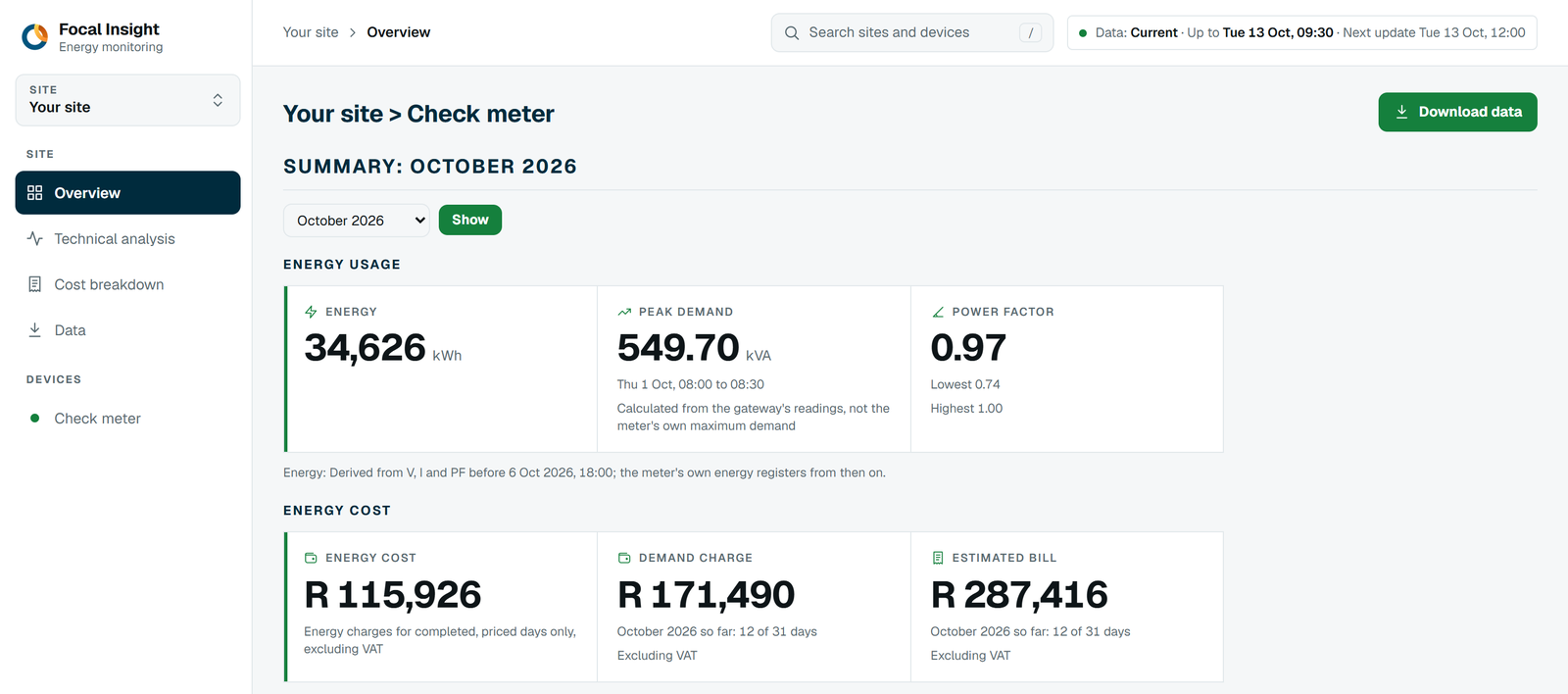
Verify billing and track consumption
The platform's own bill for each month, built from your meter and your tariff, and the half-hours behind it.
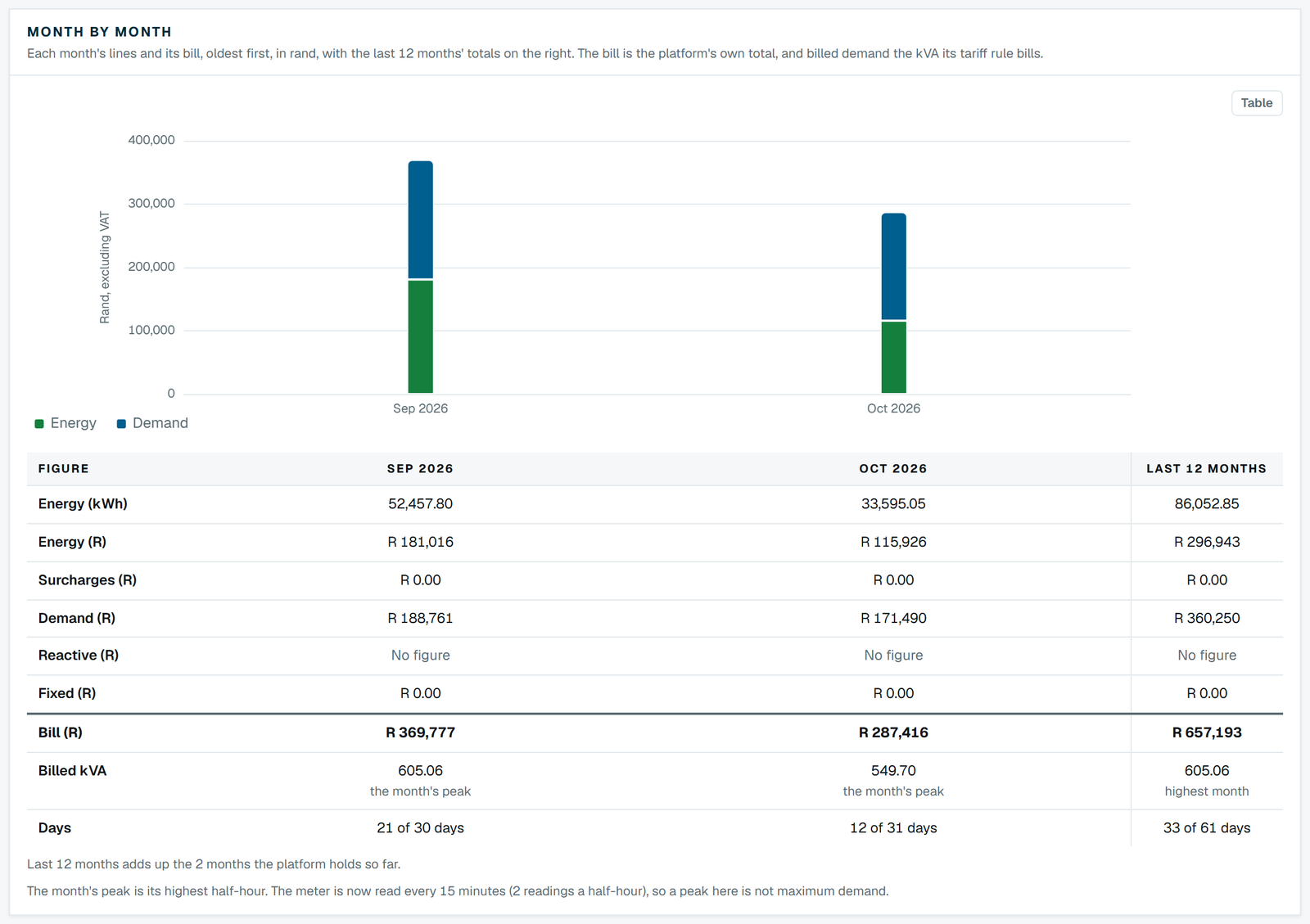
Month by month
Each month's energy, demand and other charges in rand excluding VAT, with the kWh and the billed kVA beside them: the figures to set beside the municipal invoice.
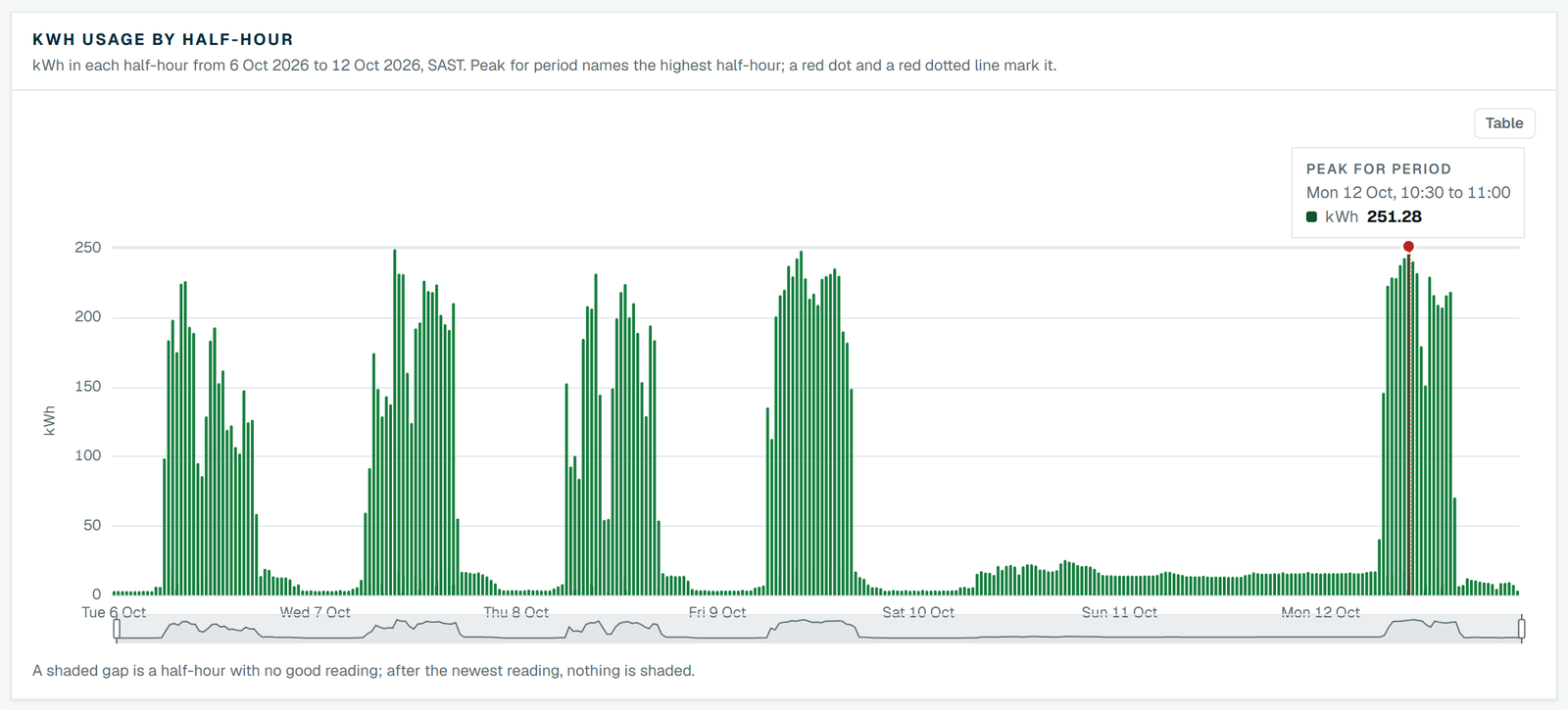
kWh by half-hour
Every half-hour of the week as a bar. Working days, the weekend and the highest half-hour stand out.
Power quality
How the supply behaved on each phase, against the bands it should stay inside.
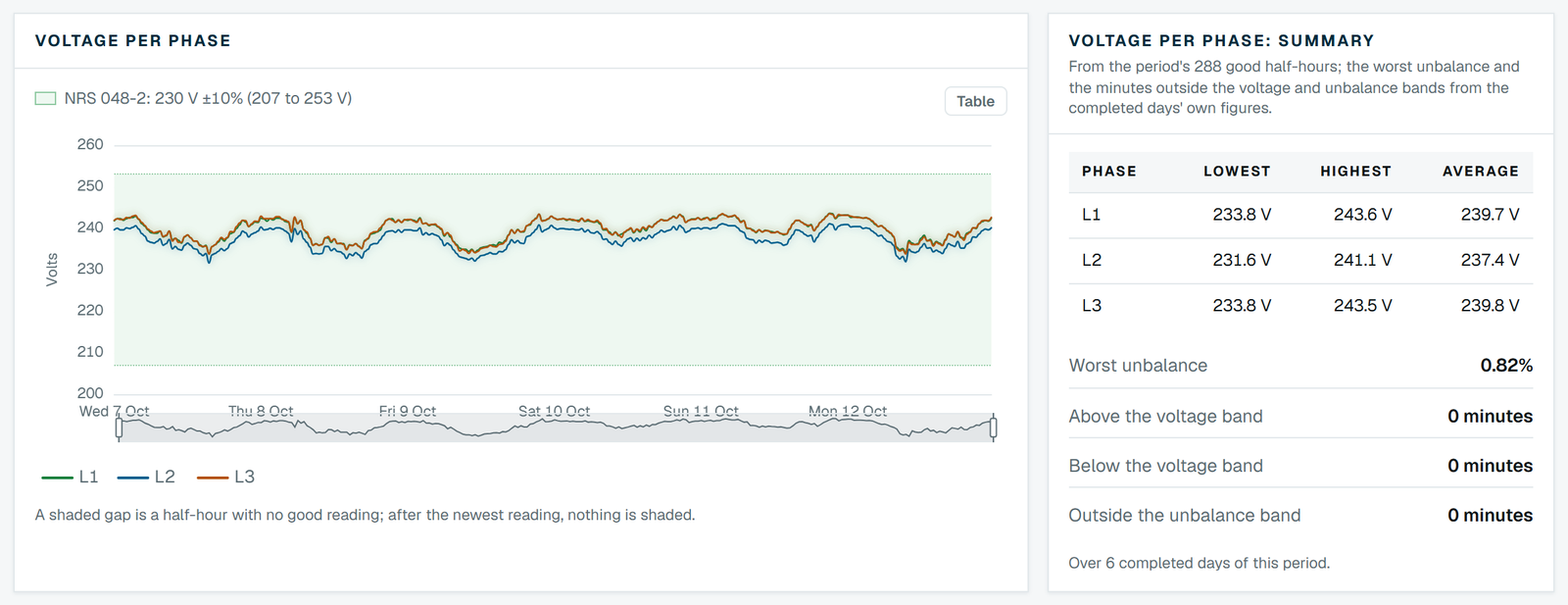
Voltage per phase
Each phase against the NRS 048-2 band, with its lowest, highest and average, the worst unbalance and the minutes outside each band.
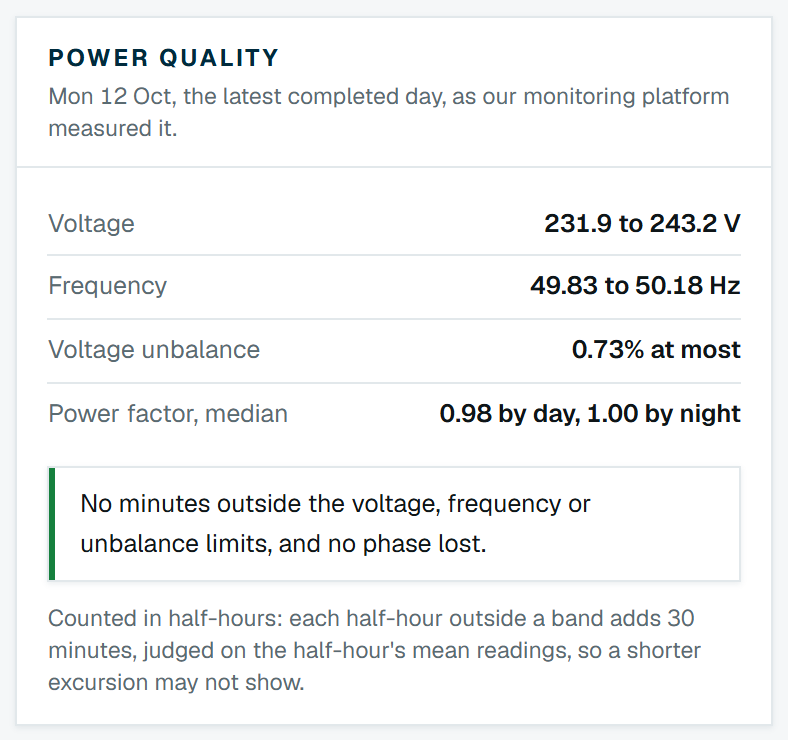
The latest day
Voltage, frequency, unbalance and power factor for the latest completed day, and whether anything left its band.
Operations and energy use
When the site uses its energy, so the habits behind the bill are visible.
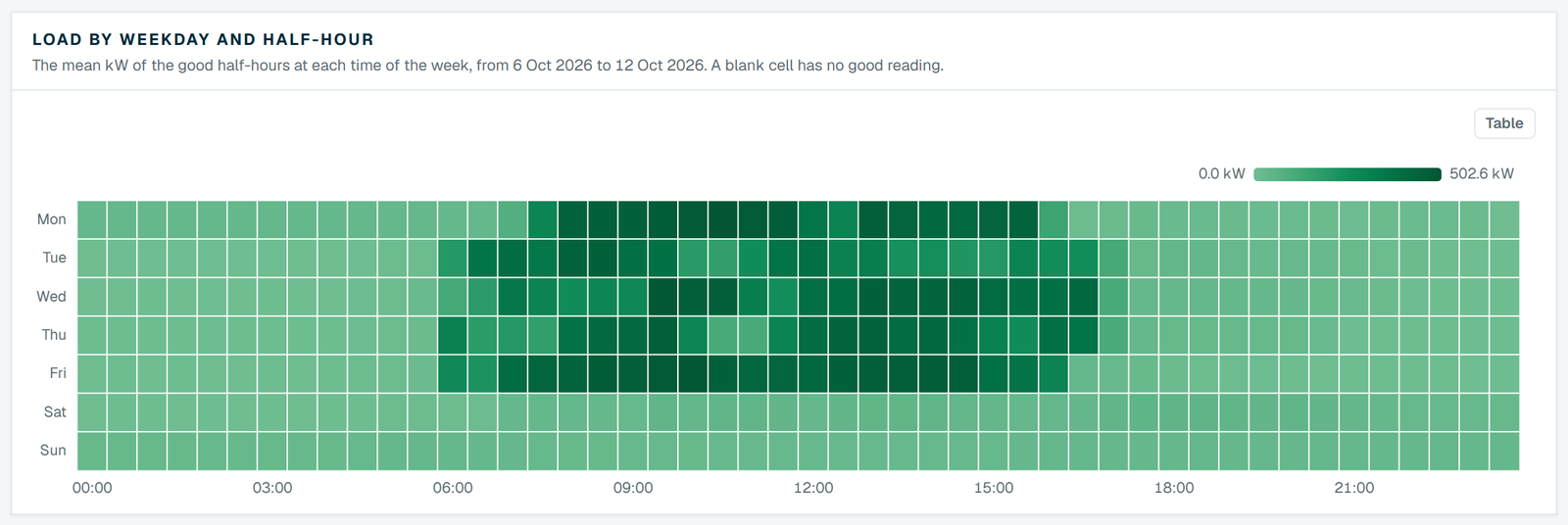
Load by weekday and half-hour
The average load at every time of the week, darker for more. Start-up times, breaks and what runs overnight and at weekends show at a glance.
Demand and power factor
The half-hours that set your demand, and the power factor in each of them.
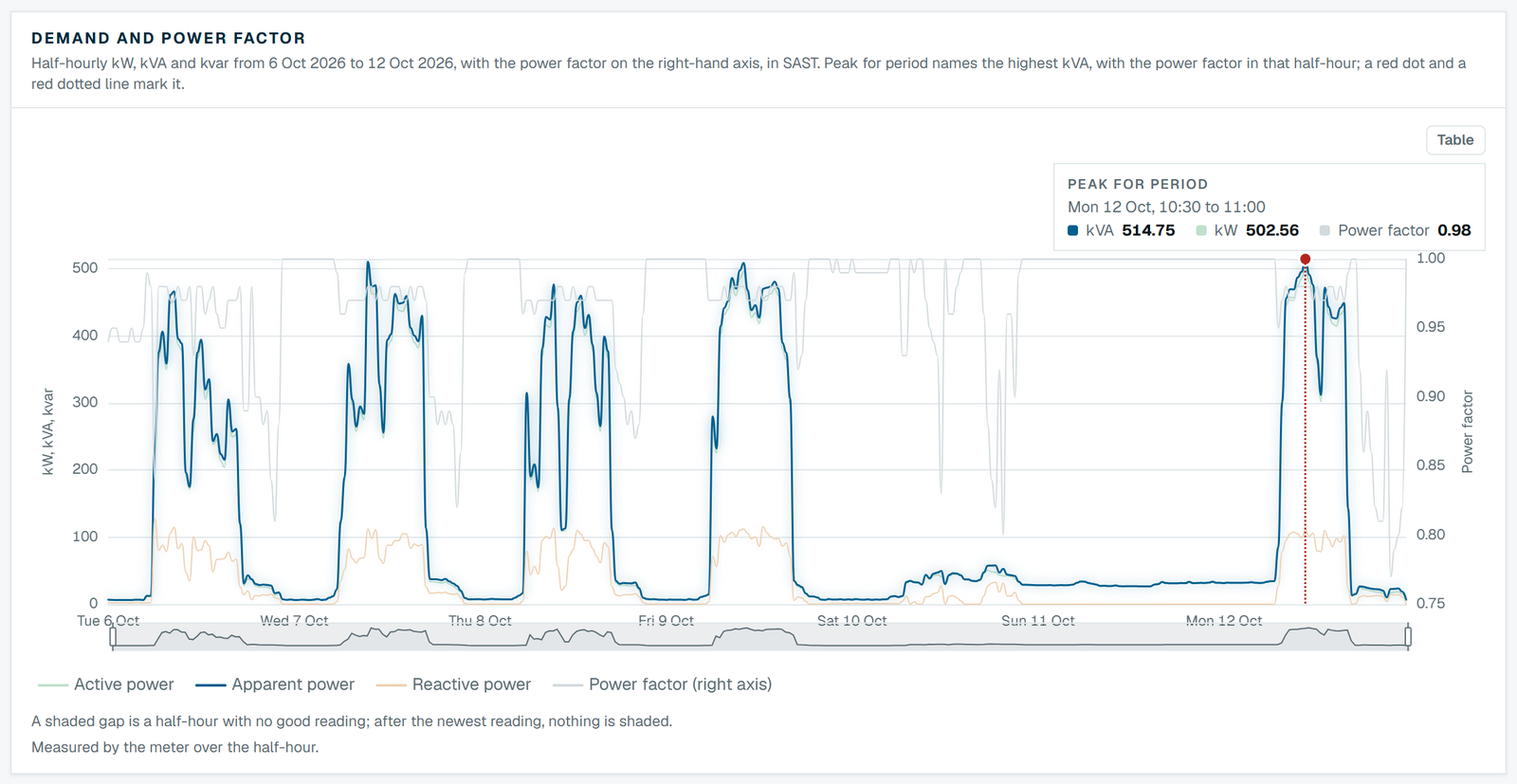
Demand and power factor
Half-hourly kW, kVA and kvar with power factor on its own axis and the highest half-hour marked, from the meter's own half-hour counters wherever they are trusted.
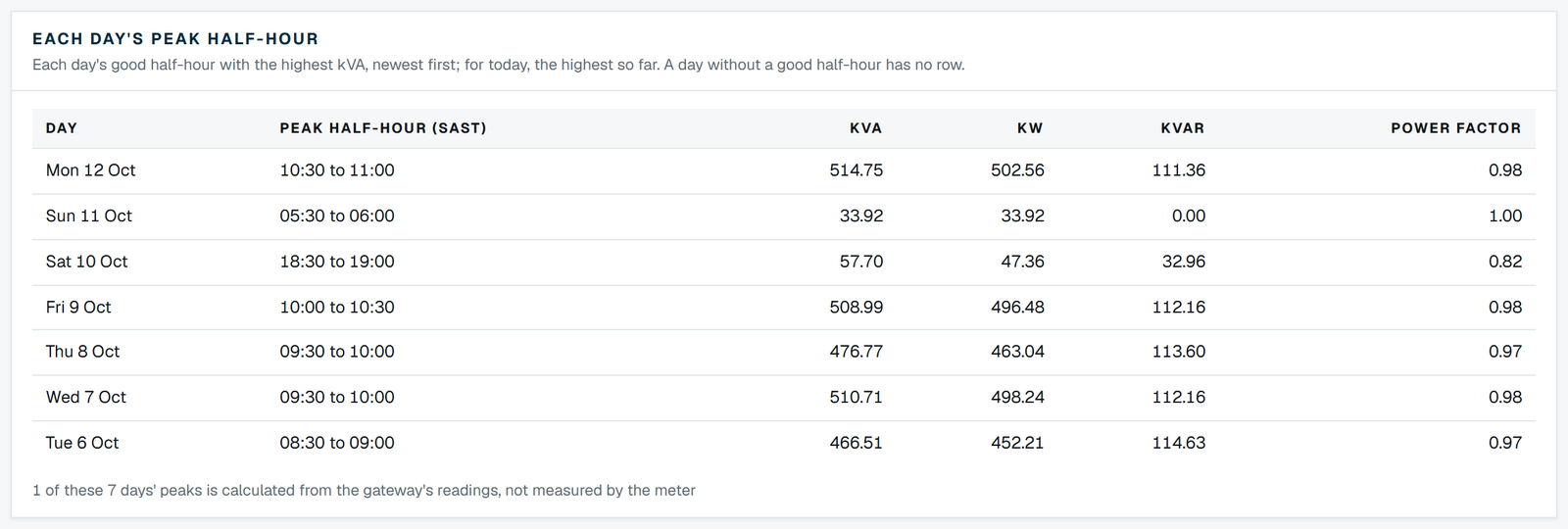
Each day's peak half-hour
The half-hour that set each day's highest kVA, with its kW, kvar and power factor: the times to watch on a demand tariff.
Charts and downloads
Your own questions, answered from the same half-hour record.
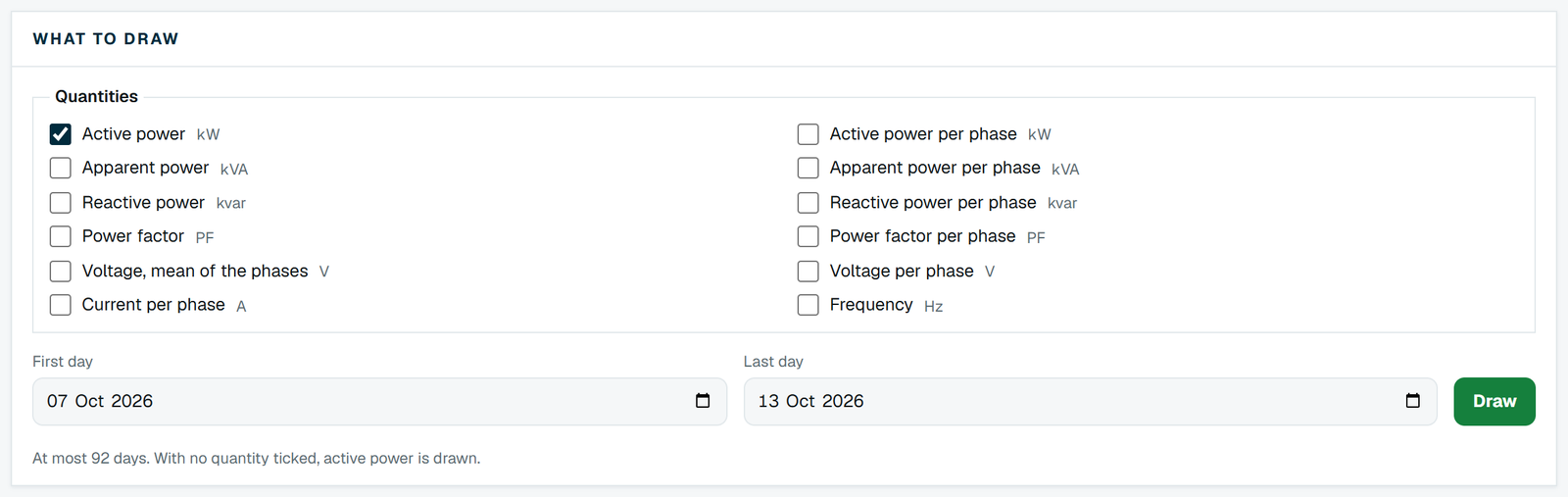
Charting
Chart any of twelve quantities over the days you choose, at 30 minutes, hourly or daily. Every half-hour can be downloaded as a CSV file for a spreadsheet, or as JSON.
How it works
From the meter to your screen
A check meter on your supply
A check meter is fitted on your incoming supply, or we connect to a suitable meter of your own already there. A logger (the screens call it the gateway) reads it every 15 minutes and sends the readings over the mobile network.
Collected and checked
Every two hours our monitoring platform collects the readings and checks each half-hour. A stale, implausible or partial reading is left out of every figure, never filled in.
Worked out
From the good half-hours the platform works out energy, demand, power factor and power quality, and prices each completed day on the tariff we hold for your site.
Your team signs in
We set up a login for each person your company names. Each login sees only its own sites and the sections chosen for it, so a site manager can follow demand without seeing costs.
Honest figures
What the numbers are, and what they are not
A figure is only useful if you know how far to trust it. Focal Insight's screens say how their figures were worked out and how fresh they are.
Measured, or worked out
The screens say where energy and demand come from. Demand comes from the meter's own half-hour energy counters wherever they are trusted; where a half-hour has to be worked out from the logger's readings instead, the screen says so.
Dated, not live
Readings arrive every two hours. Every screen shows the time of the latest half-hour and when the next update is due.
A check on the bill, not the bill
The platform's bill is worked out from your meter and the tariff we hold for your site, to check the invoice against. The invoice from your municipality or Eskom is still the bill.
Your data stays yours
Your sites' data belongs to your company, and a login with downloads can take a copy at any time. Our privacy notice sets out who handles it and where.
Common questions
Check metering and Focal Insight FAQs
What is Focal Insight?
Focal Insight is Focal Energy's energy monitoring platform for its clients. A check meter records the site's electricity supply every half-hour, and one web login shows consumption, demand, power factor, power quality and each month's cost worked out from the site's tariff.
What is check metering?
Check metering is measuring your electricity supply with a meter of your own, separate from the utility's billing meter. It gives you a second record of the same supply, half-hour by half-hour, to check the bill against and to manage your use with.
Why do we need a check meter if the council already meters our supply?
The council's meter serves the council's bill: you see its readings once a month, as totals, and sometimes as estimates. A check meter gives you the half-hours behind those totals within hours, so you can manage consumption and query a bill with evidence. You can't manage what you can't measure.
Can Focal Insight verify our municipal electricity bill?
Yes, by comparison: the platform works out each month's bill from your check meter's readings and your tariff, line by line, with the kWh and the billed kVA beside it, and you set it beside the invoice. The billed kVA is the platform's highest half-hour, so expect small differences from the council meter's own figure. Council reading periods seldom match calendar months; the half-hour download lets you add up the exact days an invoice covers. Talk to us before you dispute an invoice.
What is power quality, and why does it matter?
Power quality is how closely your supply holds its proper voltage and frequency, balanced across the three phases. Voltage that runs high or low, or phases out of balance, can trip equipment and shorten the life of motors. Focal Insight shows each phase's voltage against the band set by NRS 048-2, the South African standard for quality of supply, and counts the time outside it. It judges half-hour averages, so an excursion shorter than half an hour may not show.
How does monitoring help reduce demand charges?
By showing which half-hours set your peak. On most South African demand tariffs the charge follows the month's highest half-hour of demand in the hours the tariff counts, usually in kVA, and some tariffs also hold a floor or a 12-month maximum, so one start-up or one overlap between shifts can cost far more than its energy. Once you know when the peak happens, you can stagger loads, move a process or correct the power factor, and see the result the next day.
How kVA and maximum demand charges workWhat is power factor, and how does it affect our bill?
Power factor is the share of the power you draw that does useful work: kW divided by kVA. Where demand is billed in kVA, a low power factor raises the charge for the same work. Focal Insight shows power factor in every half-hour, so you can see whether correction is needed and whether correction already installed is doing its job.
kVA, kW and power factor in the glossaryHow up to date is the data?
Our platform collects new readings every two hours. Every screen shows the time of the latest data and when the next update is due, so you always know how current a figure is.
Who can use Focal Insight?
Focal Insight is for Focal clients. We set up a login for each person your company names, and each person chooses their own password from a link we email to them. One login can hold several of your company's sites.
Who can see our data?
Only the people your company asks us to give a login, and the Focal staff who run the service. Each login sees only its own sites, and the database itself enforces that, not only the screens. The companies that host the service and collect the readings for us are named in our privacy notice.
Can we download the data?
Yes, where your login includes downloads: every meter's half-hour rows over the days you choose, as a CSV file for a spreadsheet or as JSON for a program.
What does a site need to be added?
A check meter on the incoming supply, or a suitable meter of your own already there, and a logger that sends its readings over the mobile network. Not every meter can be read, so we confirm each new site's meter on site first.

Already a Focal client?
Sign in to see your sites. If someone in your team needs a login, ask your Focal contact and we will set it up.